


Timesheet: Work Hours Tracker
4.61.71K Reviews
App Specs
- Version
- 172.0.1
- Updated On
- License
- Free
- Downloads
- 1,000,000+
- Developer
- Timechief.com
- Categories
- Finance
- Platform
- Android
Screenshots
 Analysis by AppCompare
Hey there! If you’re like me and constantly juggling multiple projects, keeping track of work hours can be a bit of a nightmare. Enter Timesheet: Work Hours Tracker—an app that promises to make this task as smooth as butter. Let me walk you through my experience using it and see if it lives up to the hype.
Getting Started with Timesheet: Work Hours Tracker
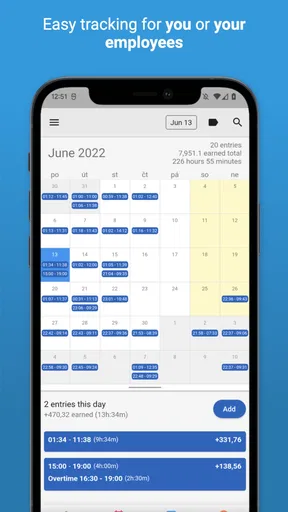
The first thing you notice when you open Timesheet: Work Hours Tracker is its clean and intuitive interface. I found it super easy to navigate, which is a big win right from the start. You can tell that the developers put a lot of thought into making the user experience as seamless as possible. Setting up is a breeze; all it takes is a few taps to input your project details and start clocking in the hours.
Features That Stand Out
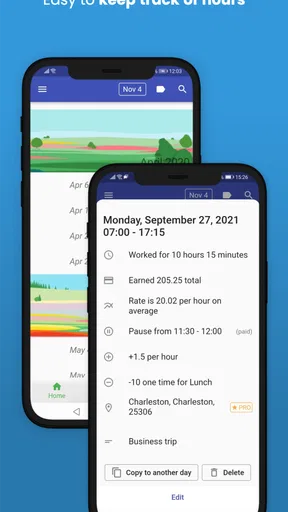
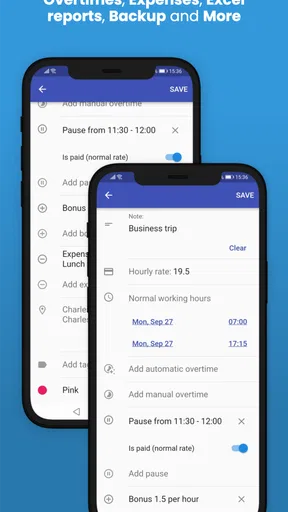
One of my favorite features is the ability to customize your timesheets. You can add as many projects as you want, and each project can have its own set of tasks. This is perfect for those of us who have multiple clients or projects on the go. Plus, you can set different hourly rates for each task, which is a lifesaver when it comes to billing.
Another neat feature is the integration with Google Calendar. You can sync your work hours with your calendar to have a comprehensive view of your schedule. It’s like having an assistant who remembers everything for you! There’s also a backup feature, so you never have to worry about losing your data.
Tracking and Reporting Made Easy
With Timesheet: Work Hours Tracker, tracking your hours is as simple as hitting start and stop. The app keeps a detailed log of your work, so you can easily see how much time you’ve spent on each task. This is especially useful for freelancers who need to provide accurate time reports to their clients.
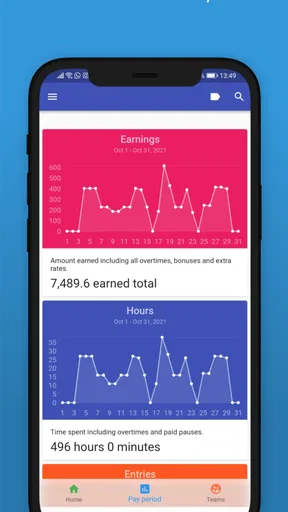
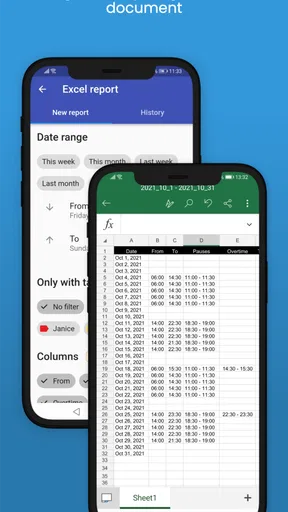
The reporting feature is another strong point. The app generates detailed reports that can be exported in various formats like PDF or Excel. This makes it easy to share your reports with clients or keep them for your own records. I found this feature particularly helpful when preparing invoices or just wanting to review my productivity over a certain period.
Room for Improvement
While the app is pretty robust, there are a couple of areas where it could improve. For example, I noticed that the notification system could be more flexible. It would be great to have more control over when and how I receive alerts about my work hours or project deadlines.
Worth Reading Before You Choose

EA SPORTS FC Mobile 26 Is a Bigger Football Game, but It Takes Time

Flipboard Shows What News Apps Must Do Beyond the Feed

Switching to Android Auto Means Rethinking Your Driving Routine

Google Calendar Makes a Crowded Week Easier to Manage

Ludo King Makes the Most of the Minutes Between Plans

Baby Panda World Brings Quick Play to Modern Phones, but Its Game Library Feels Busy
Also, while the app offers a free version, some features are locked behind a premium paywall. This isn’t uncommon, but it’s something to keep in mind if you’re on a tight budget. That said, the premium features are definitely useful and might be worth the investment if you find yourself using the app regularly.
Final Thoughts
Overall, Timesheet: Work Hours Tracker is a solid choice for anyone looking to manage their work hours efficiently. It’s intuitive, feature-rich, and does exactly what it promises. Sure, there are a few minor hiccups, but nothing that’s a deal-breaker. Whether you’re a freelancer, a project manager, or just someone who likes to keep their work life organized, this app is definitely worth checking out.
If you’re interested in giving it a try, you can download it from the App Store or Google Play. Trust me; your productivity will thank you!
Pros
- Intuitive interface for easy navigation.
- Customizable settings for various job types.
- Accurate time tracking with reminders.
- Seamless export to Excel and PDF formats.
- Multi-language support for global users.
Cons
- Limited free version features.
- No integration with third-party apps.
- Occasional sync issues reported.
- Steep learning curve for new users.
- Battery consumption can be high.
FAQs for Timesheet: Work Hours Tracker
What is Timesheet: Work Hours Tracker and who is it for?
Timesheet: Work Hours Tracker is an app designed to help users efficiently track their work hours, breaks, and project durations. Ideal for freelancers, contractors, and employees, it simplifies time management and ensures accurate billing. Whether managing multiple projects or simply tracking daily hours, this app caters to a wide range of professional needs.
How does Timesheet: Work Hours Tracker ensure data accuracy?
The app allows users to manually input work hours or use the built-in timer to log their time in real-time. It supports break tracking and offers features to edit or adjust entries for accuracy. Users can review detailed reports and export data to verify and ensure the precision of their time records.
Is Timesheet: Work Hours Tracker compatible with both Android and iOS?
Yes, Timesheet: Work Hours Tracker is available for both Android and iOS platforms. It offers a seamless experience across devices, ensuring users can access their data anytime, anywhere. The app is regularly updated to maintain compatibility with the latest operating system versions and devices.
Does Timesheet: Work Hours Tracker offer any integration with other tools?
Timesheet: Work Hours Tracker integrates with popular productivity and accounting tools, enabling seamless data transfer and enhanced workflow. Users can export reports in various formats, such as CSV or PDF, making it easy to incorporate time tracking data into existing project management or accounting systems.
What privacy measures are in place for Timesheet: Work Hours Tracker?
The app prioritizes user privacy by implementing robust security protocols to protect stored data. Personal data is secured with encryption, and users can control their data sharing preferences. Additionally, the app complies with international data protection regulations, ensuring a secure and trustworthy user experience.


